

Looking to take your competitor research to the next level? Adplexity’s Advanced Search offers powerful tools to dive deep into ad intelligence data.
With its advanced capabilities, you can combine multiple filters and keywords to pinpoint exactly what you want, even down to 3-character precision inside URL redirect chains. This opens new doors for serious affiliate marketers and media buyers.
Why Adplexity Advanced Search Matters
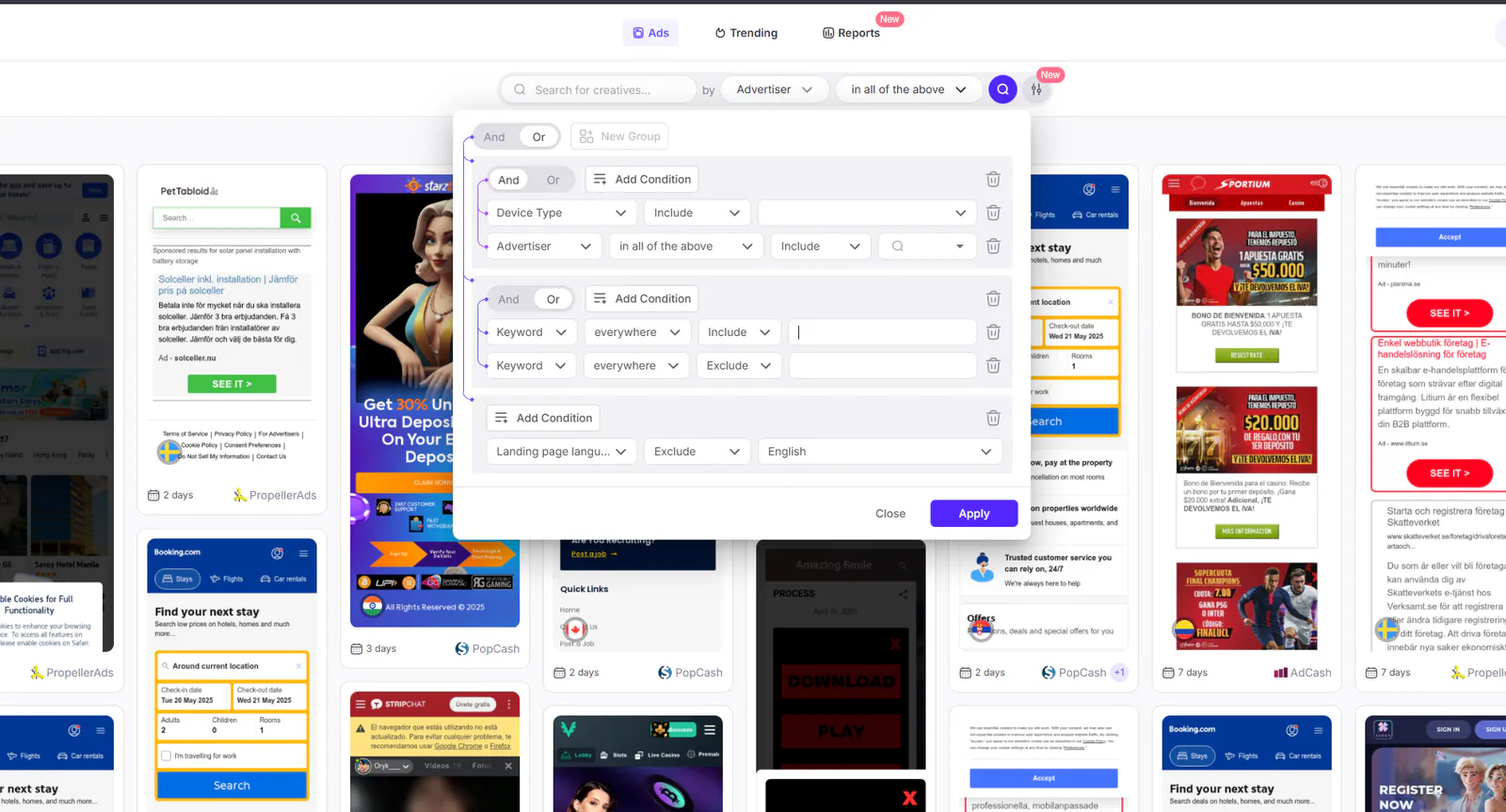
- Combine up to 15 unique rules per search
- Use up to 3 groups with 5 conditions each
- Choose between AND (strict match) or OR (broad match) logic for precise results
- Access 18+ filters tailored for each Adplexity tool
Common Filters Across Adplexity Tools
- Adplexity Mobile: ad type, advertiser, affiliate network, arbitrage network, bid price, connection, countries count, country, days running, device type, image tags, keyword, landing page language, placement, publisher, technology, tracking, traffic source.
- Adplexity Push & Native: include vertical filter
- Adplexity Desktop: additional size filter
- Adplexity YouTube: video-specific filters like likes, views, length, and type
Basic Search Techniques
1. Start with Advertiser + Redirect Chain
Filter by advertiser and dig into the redirect chain to gain high-value insights. For best results, combine with filters like Country, Language, Device Type, and Connection.
2. Use AND/OR Logic Smartly
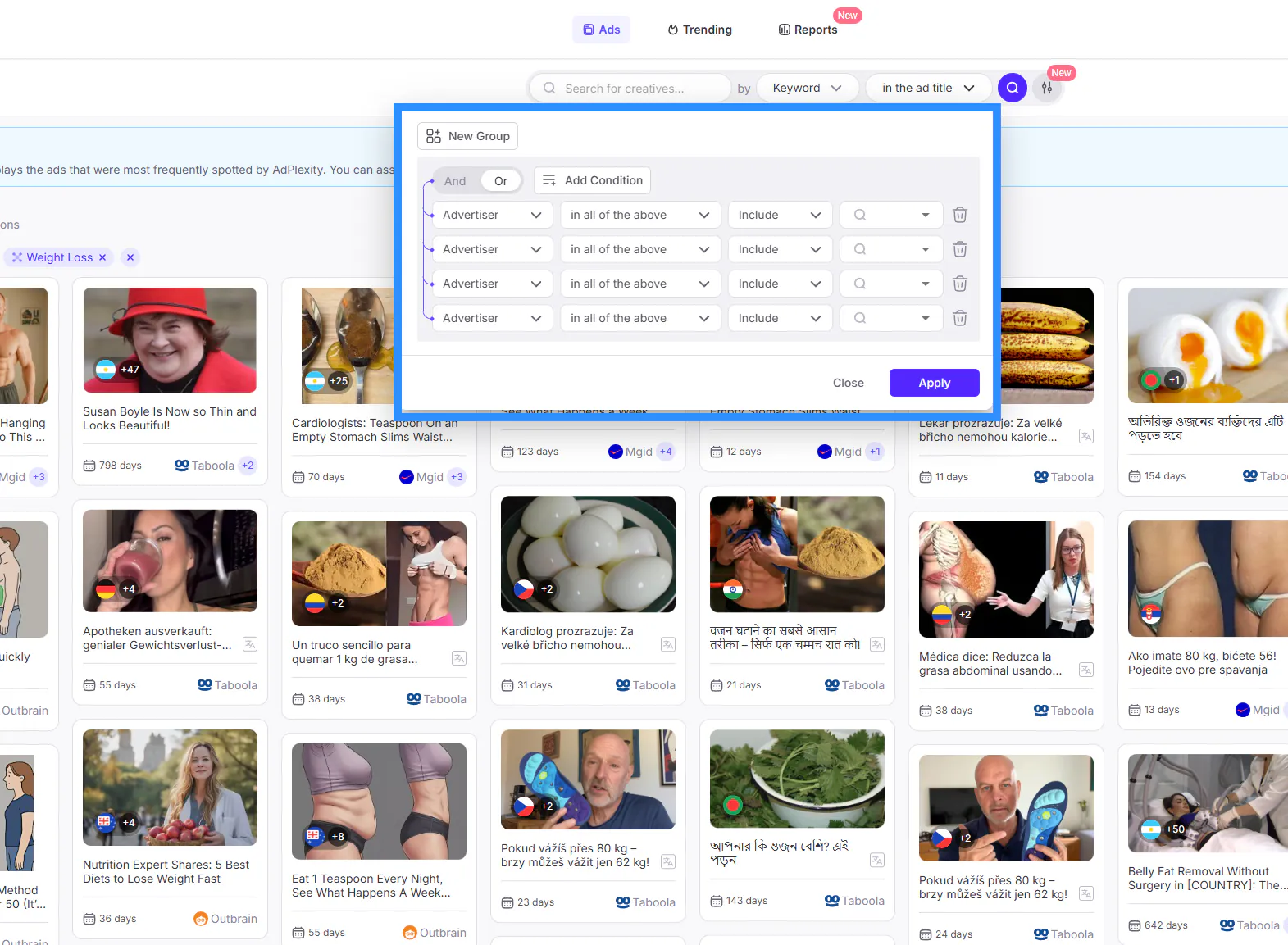
- Use AND for highly targeted searches (e.g., landing page + device type + carrier)
- Use OR for broader, exploratory searches
- Mix both in one query for balance, enabling up to 32+ conditions per search
3. Choose Relevant Filters Based on the Tool
- Select ad types matching your current tool (native, push, mobile, etc.)
- Avoid using “Include Exact” or “AND” with affiliate networks across platforms to prevent false results
- Use the “Include”, “Not include” and “Exact” filters carefully for affiliate networks and traffic sources. Never use “Include Exact” or “AND” with the affiliate networks below: they run across all platforms (native, push, pop and desktop).
AboveAllOffers, Accesstrade, Ad Bazaar, Ad Up, Ad-center, Ad4Game, AdAction, AdCombo, AdExchanger, AdLover, AdStart, AddsPro, Addservice media, Adintop, Admitad, Adperio, Adprofess, Adsimilis, Adstrategy, Advercenter, Advertise, Advice Me, Advidi, Adxmi, AdzMedia, Adzone Media, AffOcean, AffShark, Affigate, Affiliate DTI, Affiliate Dragons, Affiliati, Affiliaxe, Affscale, Alibaba, Amateur.tv / Amateur.cash, AppFlood, Appiris, ArabAdsMedia, ArabyAds, Aragon Advertising, Aramis Interactive, Arkeero, Art Of Click, Assurance, Atlas VPN, AvantLink, Avazu, Awin, BOAElite, Beeleads, BeyondSpark, Bidder place, Big Bang Ads, BinPartner, Bitterstrawberry, BizProfits, BlackFox.io, Blind Ferret Media, Bruce Lead, Brus Media, Buongiorno, BuyGoods, BuzzCreators, C5, CJ, CPA Matica, CPAGrip, CasinoRewards, Ceneo, Clariad, Click tree, ClickBank, ClickDealer, ClickForward, ClickSure, ClicksMob, Convert2Media, Convertri, CrakRevenue, Crobo, Cryptocoinsad, Cyber Ghost VPN, DAO of Leads, DeluxeAds, DepositPhotos, Digital Spearhead, Digital Virgo, DomobMedia, Dr.Cash, DreamTeamWeb, Everad, Everflow, EveryAds, ExpertMobi, F5 Media, Fluent, FrontLeads, FurtherMobi, G P Marketing, GamesVid, GiddyUp, Glispa, Go-rilla, GoWide, Golden Goose, Gotzha, H8M8, Halexo Media, HappyCrocky, HealthBeauty, Healthy Habits, Hummer Offers, IlluminateMedia, ImaXcash, ImpactMobi, Inbox Labs, Inflecto Media, Insparx, Involve, JumbleBerry, Kantar, Kin Affiliates, King.com, KobiDigital, LeadBit, LeadHits, Leadhug, Leadrock, LegacyResearch, LetsCPA, Linkadia, Little Star Media, Lumata, Luna Park, MCC MANAGEMENT GROUP, MOBIPIUM, MPIRE Network, Magichygeia, MarketHealth, Marketing Vici, Matomy Market, MauLead, Max Bounty, MaxWeb, MaximusX, Media500, MediaForce, Meridianbet, MobPartner, Mobaloo, Mobave, Mobidea, Mobifreak, MobileTraffic.de, Mobisummer, Mobite, Mobitune, Mobobeat, Mobusi, Mobvista, Motive Interactive, Mundo Media, MyLead, Neomobile, Neverblue, NewMarket Health, None, NordVPN, Nutryst, Oasis, OfferWave, Offeriz, Offerslook, OmniCPA, Partner Lottery, Partners Pineapple, Peerfly, Performance Revenues, PocketOption, ProSam, PromoRich, Prospect One, Publishers Internationale, RainyDayMarketing, ReflexCash, ReklamStore, RevenueGiants, RevenueLook, Revi Media, RewardsAffiliates, RocketProfit, Roiandco, SHAKES.MOBI, Sammedia, Say CPA, Scaleo, SecondProfit, Sekomedia, SendT, SevenGames Network, Shop Deal, Siren Group, Slim Spots, SmartADV, SmartAdv, Soicos, SolidClix, Sparklemob, Spicyoffers, Spyke Media, SpykeMedia, Ströer Mobile Performance (ex KissMyAds), Surf In Ad, Surfshark, TD Track Club, Tamome, Tapgerine, Taptica, TheMobiAdz, TheSocialMan, TopOffers, Toro Advertising, TradeTracker, Tradedoubler, Trafficon, UniLead, Unknown, Valueleaf, VictoriaDates, VikingClicks, VortexAds, W2Mobile, Wadogo, WapEmpire, XLWIN CPL CAMPAIGNS, YeahMobi, YepAds, Zcoinpay, Zenith Labs, ZinQ Media, cpagetti, mXpresso, mobilife+, vComission, wildo.click
The same applies to traffic sources:
AdBlade, AdCash, AdExpansion, AdGear, AdMaven, AdMicro, AdNow, AdTwirl, Adcrax, Adform, Adgoi, Adiquity, Admoda, Admoj, Adrenalead, AdsKeeper, AdsTerra, Adsty, Adverster, Advertising.com, Adwora, Adz.Mobi, Airpush, Ajillion, AmoAd, AppNexus, AppTV, Appier, Avazu, BidVertiser, BuzzCity, CPMStar, ClickAdilla, Content.ad, Criteo, DaoAd, DatsPush, DefinitiMedia, Doubleclick, EroAdvertising, EvaDav, ExoClick, Go2mobi, Google, InMobi, Izooto, JuicyAds, KetAds, Kimia, Leadbolt, LeoCash, MediaMath, MegaPush, Mgid, MillennialMedia, Mobfox, Nativo, OpenX, Outbrain, PlugRush, PopAds, PopCash, PropellerAds, Pulsepoint, PushAd, PushAds, Pushnami, Reporo, RevContent, RichAds, RocketFuel, Rubicon, SiteScout, Slimspots, Smaato, StartApp, StrikeAd, Taboola, TeaserNet, TheTradeDesk, Tictacti, TrafficFabrik, TrafficFactory, TrafficForce, TrafficHaus, TrafficHunt, TrafficJunky, TrafficStars, TribalFusion, Turn, UC Union, Unknown, Yahoo Gemini, YouTube, Zanox, Zeropark
Maximize Your Results with Advanced Techniques
Here are some advanced techniques to help you get the most out of Adplexity’s new advanced search features:
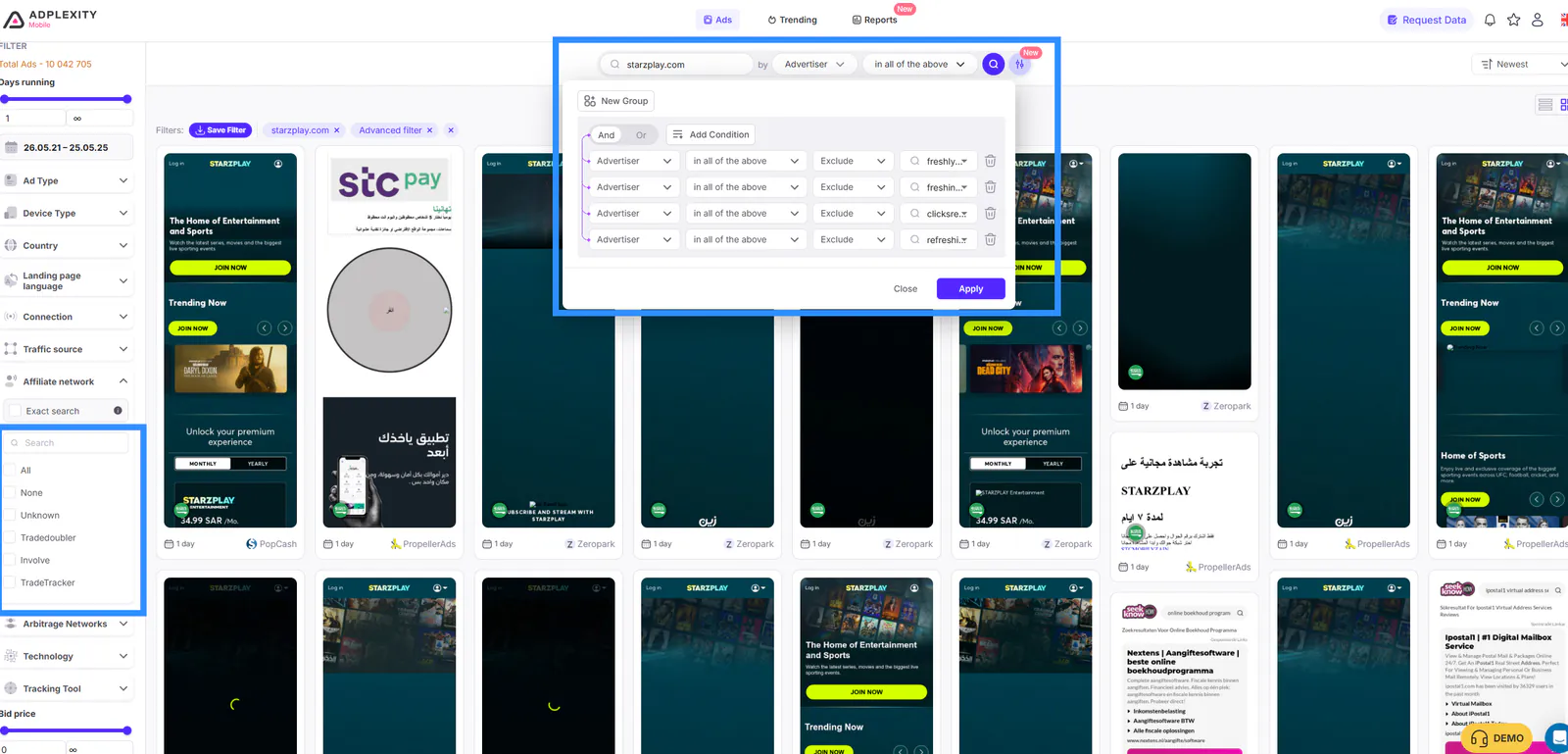
1. Find Exact Offers in Affiliate Networks (e.g., Mobipium) Across Other Networks or Direct Advertisers
This technique has two main parts:
Part A: Identifying Mobipium Tracking Domains
- Use filters like Advertiser "mob="+ “Include” + tracking parameters such as
s1.,s2.,s3., ors4.
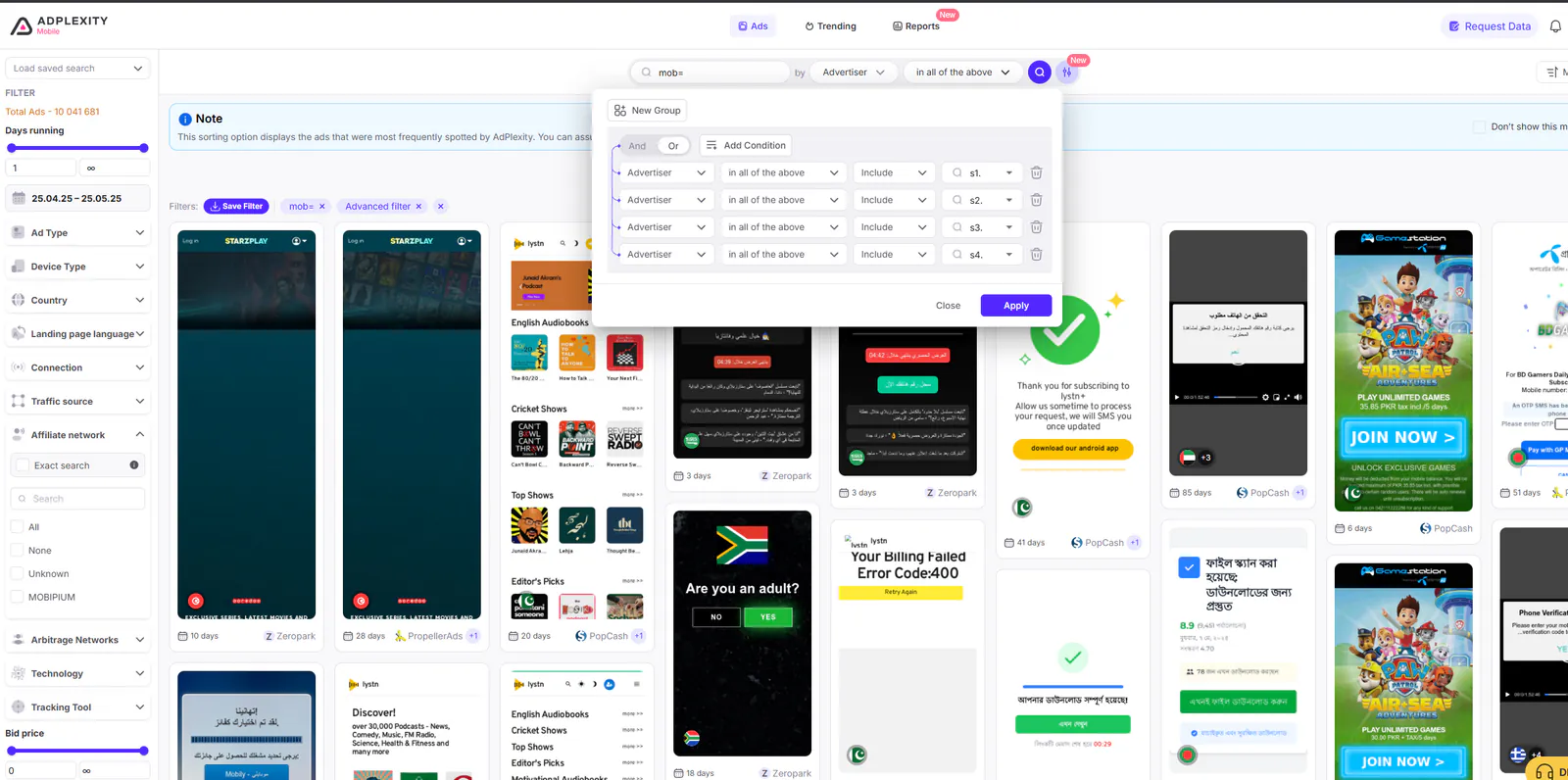
As a result, you will get different Mobipium tracking domains, for example:
- freshlyclicks.com
- freshingclicks.com
- clicksrefresh.com
- refreshinclicks.com
These domains are linked to Mobipium offer tracking.
Part B: Checking Other Affiliate Networks Running the Same Offers
- In search results, review ads, and search with their main offer pages
- Exclude all Mobipium tracking domains to filter out Mobipium-specific ads
- This reveals ads promoting the same or similar offers on other affiliate networks
How to do it:
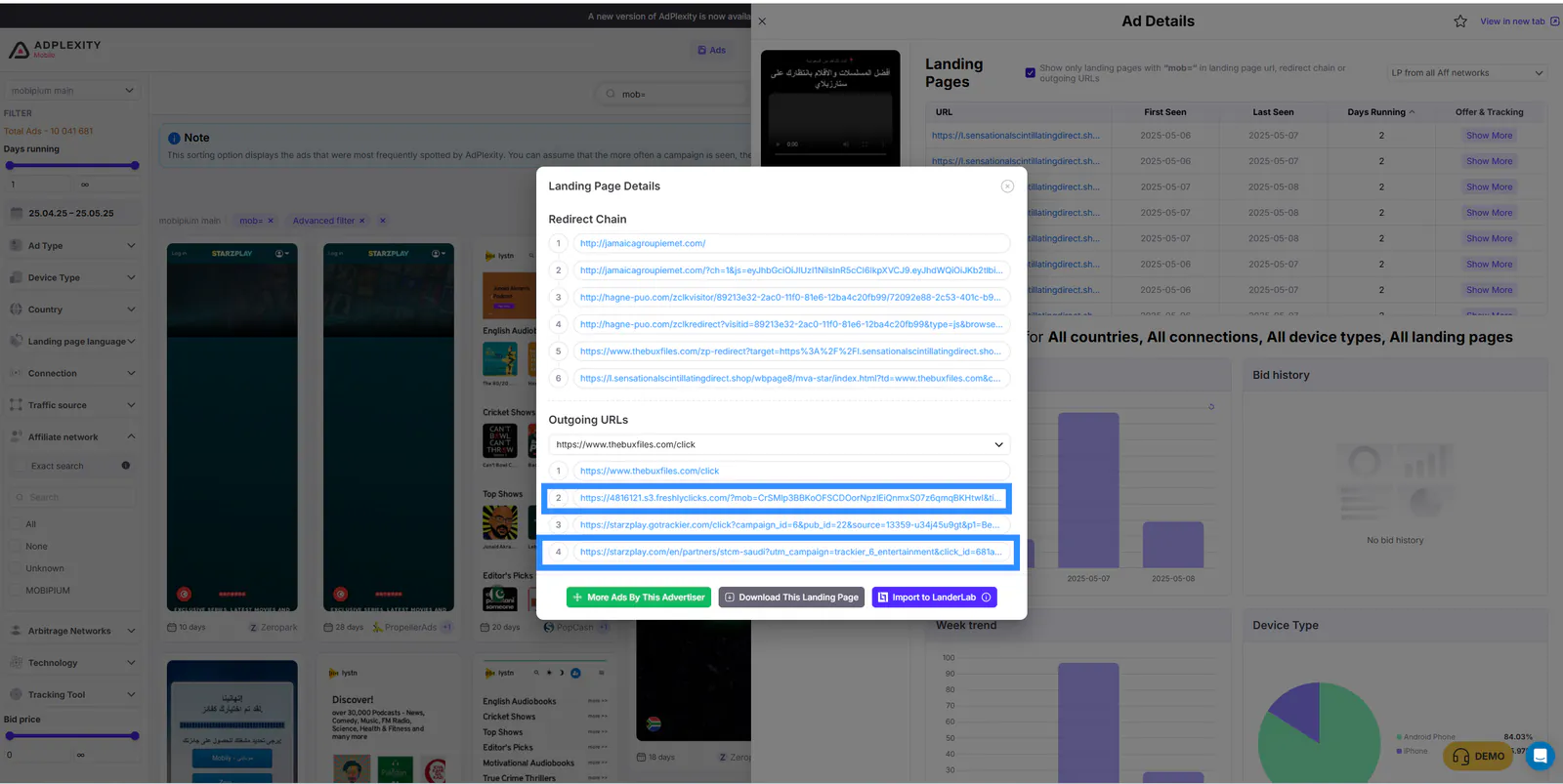
- Search using the main offer domain
- Exclude Mobipium tracking domains
- Get all ads running these offers outside of Mobipium
2. Uncover Golden Goose Offers
To identify the most recent and active offers from the Golden Goose network, you can leverage Adplexity's advanced search with precise rules that target their tracking and redirect patterns. Here’s how to structure your advanced search to uncover high-performing Golden Goose campaigns.
Step 1: Identify Common Redirect Patterns
Use multiple groups with specific conditions. Each group will help narrow down Golden Goose offers by identifying patterns in their tracking links.
Group 1 (AND Logic):
- Advertiser + "All of the Above" + Include + /cl/
- Advertiser + "All of the Above" + Include + .com
Group 2 (OR Logic):
- Advertiser + "All of the Above" + Include + /cl/
- Advertiser + "All of the Above" + Include + .net
Group 3 (OR Logic):
- Advertiser + "All of the Above" + Include + /cl/
- Advertiser + "All of the Above" + Include + any other domain extension (e.g., .xyz, .cyou, .bid, etc.)
This advanced search setup will reveal the most up-to-date offers running through the Golden Goose network.
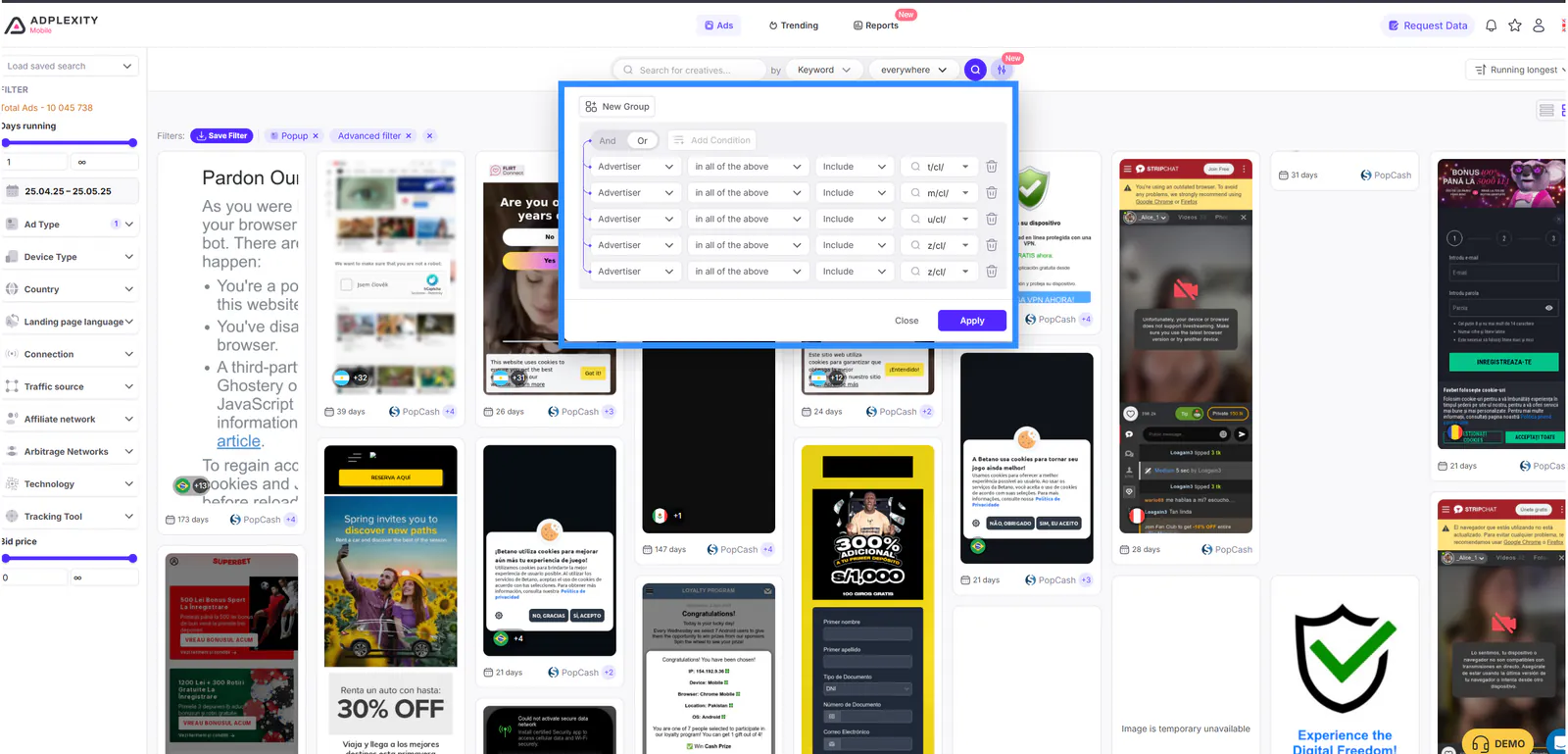
Step 2: Deep Dive with Letter-Based Redirect Patterns
Once you find key domains, use a deeper advanced search to analyze specific redirect paths often used by Golden Goose.
Group (OR Logic):
- Advertiser + "All of the Above" + Include + m/cl/
- Advertiser + "All of the Above" + Include + t/cl/
- Advertiser + "All of the Above" + Include + g/cl/
- Advertiser + "All of the Above" + Include + u/cl/
- Advertiser + "All of the Above" + Include + d/cl/
- Advertiser + "All of the Above" + Include + z/cl/
You can replace these letters based on the last character of the domain extensions Golden Goose might be using (e.g., .com, .net, .cyou, .xyz, etc.).
Step 3: Analyze and Isolate Golden Goose Domains
After performing your advanced search:
- Review the domains from the search results.
- Many of these are either actively used by Golden Goose or parked for affiliates promoting their offers.
- You can isolate each domain into individual advanced search queries to analyze offers running on each
3. Advanced Search Setup to Find Zeydoo Survey Offers
To uncover Zeydoo survey campaigns (including sweeps, financial surveys, and more), you can apply a simple yet powerful advanced search technique in Adplexity.
Use this advanced search rule:
Single Group (AND Logic):
- Advertiser + “All of the Above” + Include
-survey - Advertiser + “All of the Above” + Include
ymid
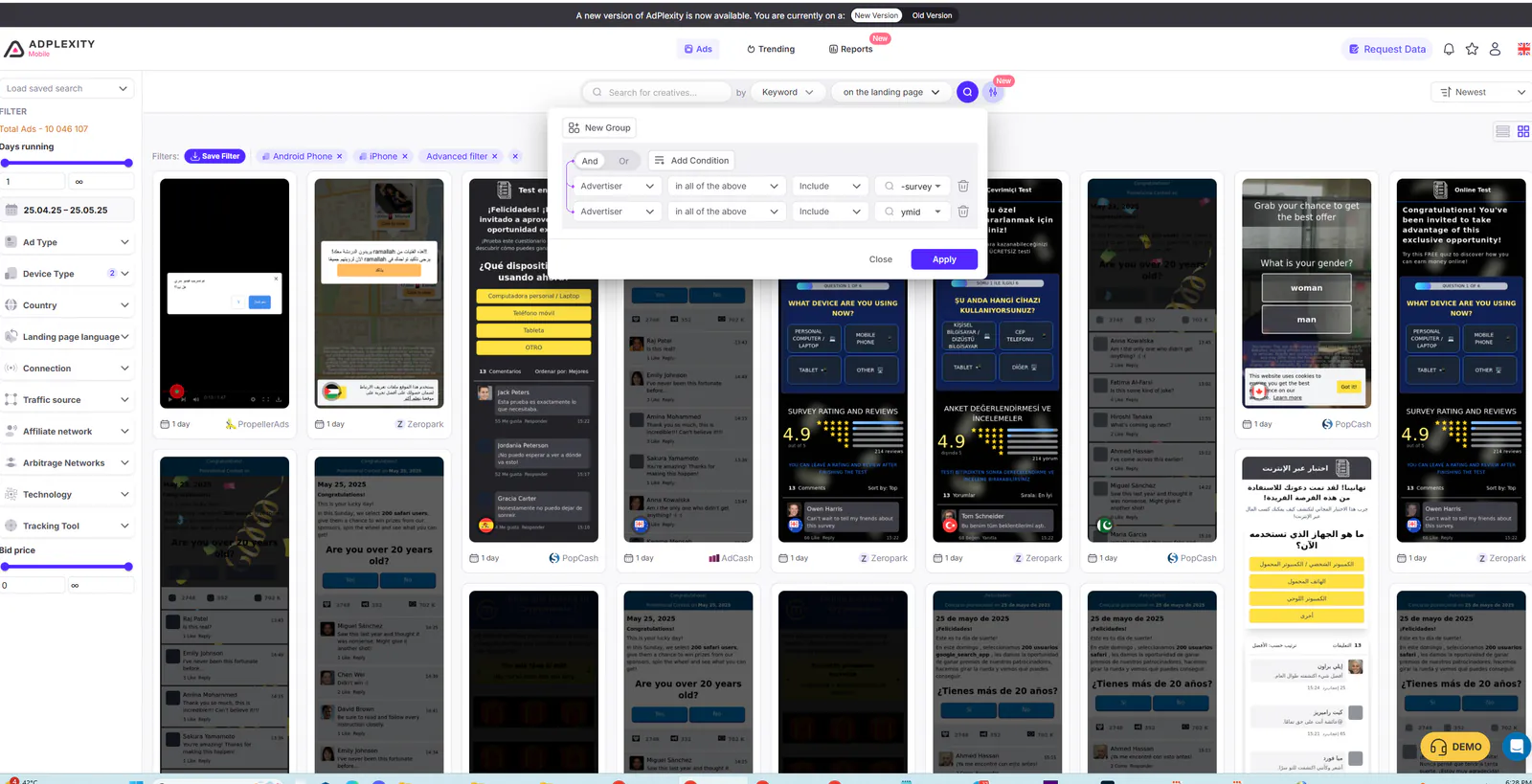
This advanced search combination is specifically designed to identify active and past ads promoting Zeydoo-related survey offers. The -survey keyword helps isolate typical survey-based campaigns, while ymid is often found in Zeydoo’s tracking parameters, making this a highly targeted search.
4. How to Find All Zeydoo Survey Offers Except Rewardis
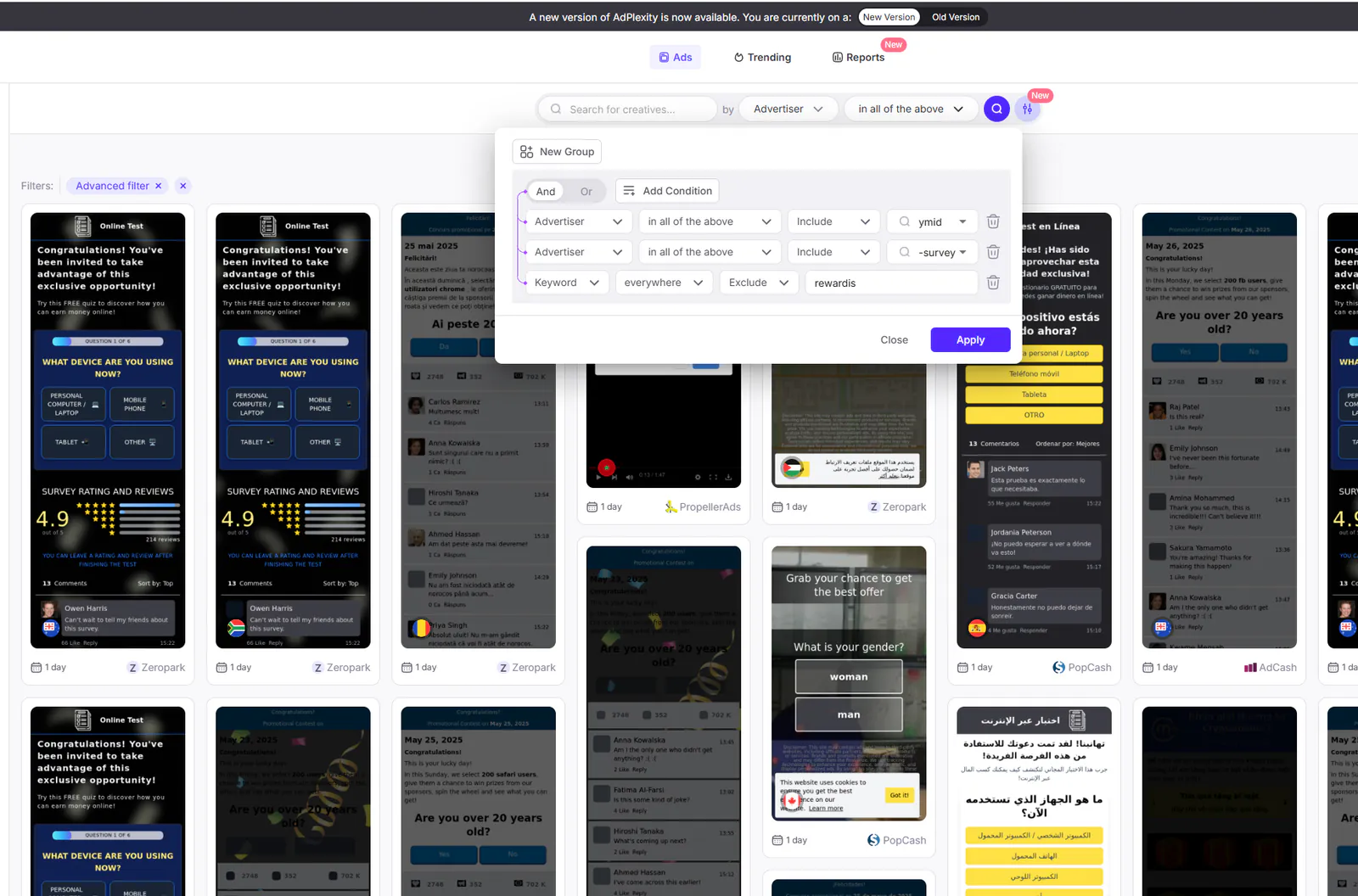
If you're looking to uncover Zeydoo survey campaigns but want to exclude Rewardis-related offers, you can easily do this using Adplexity’s advanced search with a precise filtering strategy.
Start with the same group as before:
Group (AND Logic):
- Advertiser + “All of the Above” + Include
-survey - Advertiser + “All of the Above” + Include
ymid
Then, to exclude Rewardis offers, simply add a keyword exclusion filter:
- Keyword + “Exclude” +
Rewardis
This is a highly targeted advanced search, which is why we use AND logic instead of OR. Using AND filters ensures that only ads meeting all specified conditions appear in the results, making your campaign research more precise and efficient.
5. Find All Offers from the Traffic Company Affiliate Network
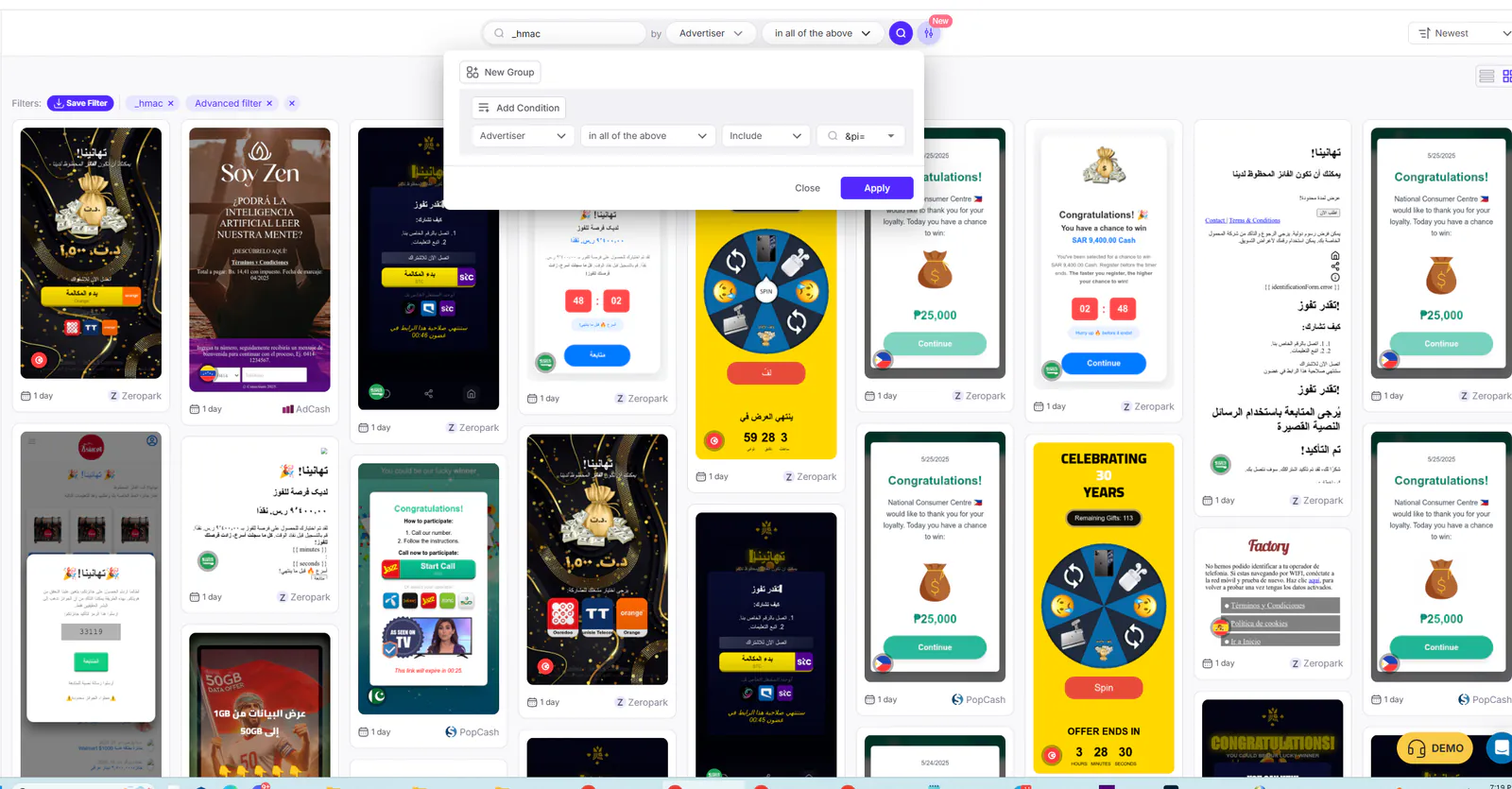
To uncover all active ads from the Traffic Company affiliate network, you can use a focused advanced search strategy in Adplexity. Start by searching for _hmac, a common identifier in their tracking URLs. Then, create a single group in advanced search with this rule:
- Advertiser + “All of the Above” + Include
&pi=
This combination helps you detect Traffic Company campaigns by matching unique tracking patterns associated with their affiliate links.
6. Spy on Mobile Ads Using Adplexity Advanced Search
- Add advanced filters for countries and carriers
- Exclude Wi-Fi traffic: Connection + Exclude + WIFI
- Explained in detail in this guide
7. Advanced Search with Keywords
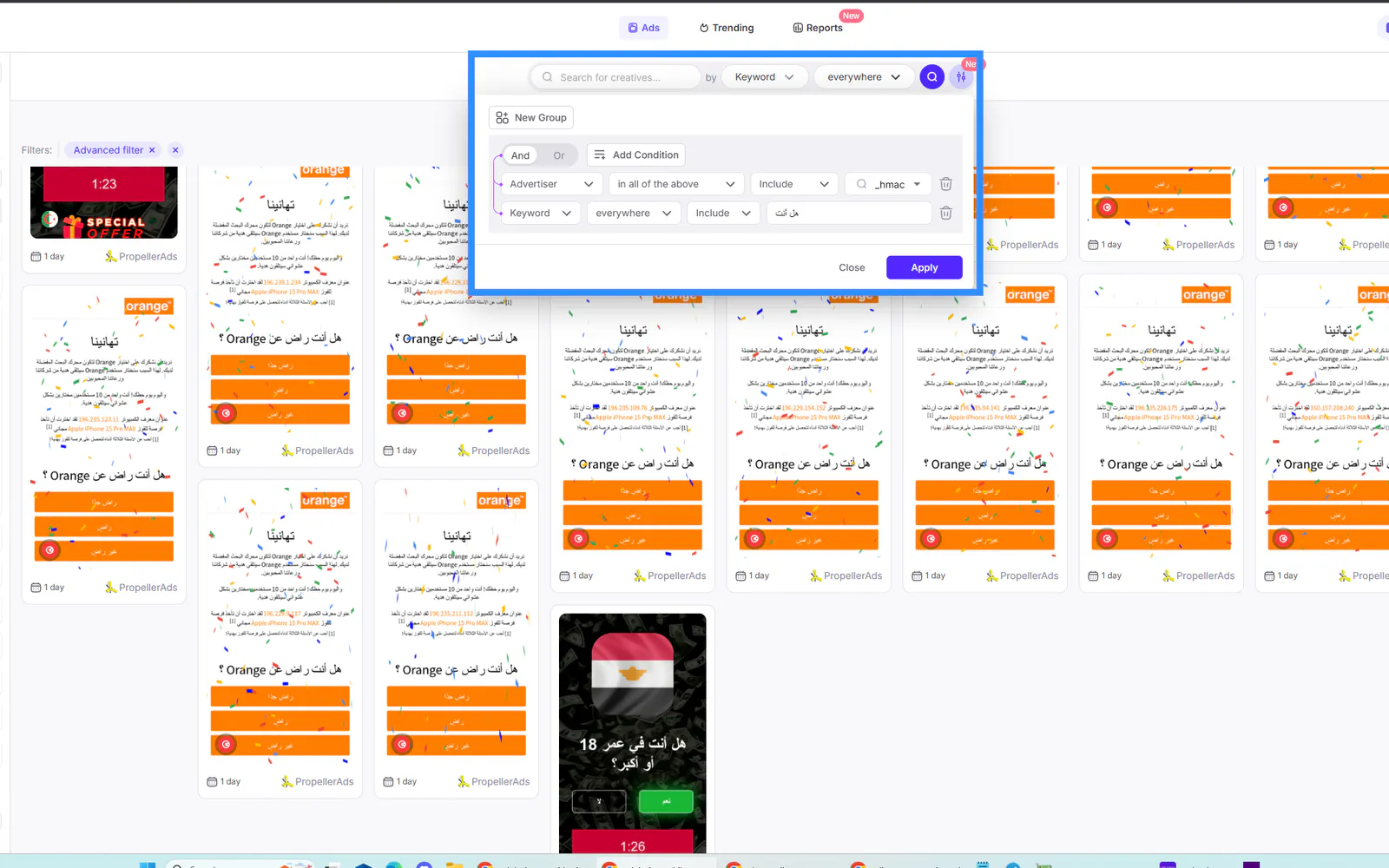
Adplexity’s keyword search feature is incredibly powerful, especially when you're looking for very specific landing pages. However, it’s important to use this tool wisely. If you’re searching for precise phrases like:
- "هل أنت سعودي" (Are you Saudi?)
- "هل أنت مصري" (Are you Egyptian?)
- "Are you South African?"
You must first ensure that these landing pages are already indexed in Adplexity. Otherwise, being too specific can lead to false negative results, meaning relevant campaigns might not appear. To get the best outcome from Adplexity's advanced search, balance specificity with broad targeting, especially when filtering by regional or language-based landing page content.
Final Thoughts: Mastering Adplexity Advanced Search for Maximum ROI
When it comes to competitive intelligence and campaign research, Adplexity’s Advanced Search is a game-changer for performance marketers, media buyers, and affiliate pros. Whether you're looking to uncover hidden affiliate offers, track redirect patterns, or filter campaigns by granular rules, the power lies in your ability to use advanced search logic smartly.
From isolating Golden Goose and Zeydoo survey offers to identifying Traffic Company campaigns, the right combination of filters (AND/OR logic, keyword inclusion/exclusion, and redirect tracking) can unlock opportunities your competitors are missing.
By applying these advanced techniques, you'll gain:
✅ Laser-targeted campaign insights
✅ Access to hidden landing pages and affiliate tracking domains
✅ Competitive edge in any vertical: sweeps, finance, health, dating, and more
📊 Remember: With up to 15 rules and 3 custom groups per query, the possibilities for advanced search are nearly endless.
🚀 Ready to take your ad campaigns to the next level?
Join top affiliates and marketers already using Adplexity’s Advanced Search to scale smarter and faster.
👉 Start your Adplexity journey today and take your campaigns to the next level.