

Adplexity continues to raise the bar for performance marketers, affiliate professionals, and media buyers with a game-changing new feature: Custom Reports. With an upgraded UI and enhanced filtering system, this feature transforms how users gather, analyze, and automate ad intelligence data across all Adplexity tools.
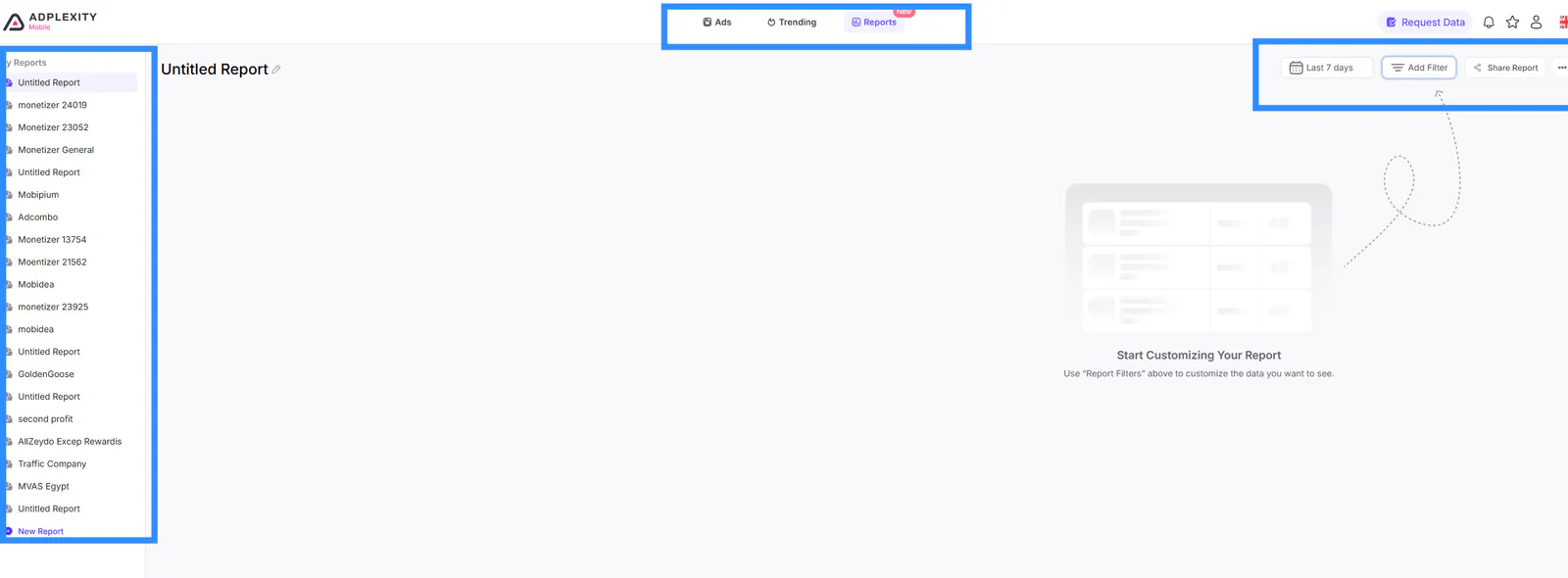
If you’re serious about affiliate marketing or media buying, understanding how to harness the power of Adplexity Custom Reports will save you hours of manual tracking, deliver key insights to your inbox, and help you scale with precision. In this guide, we’ll walk you through everything you need to know.
Why Custom Reports Are a Game-Changer:
Before diving into how to use them, let’s understand the difference between Reports and Alerts within Adplexity:
- Alerts were previously limited to tracking time and domains and could only be viewed on the Adplexity site.
- Reports, on the other hand, offer expanded functionality. You can combine up to 15 filters, organize data into three groups with five conditions each, and select dynamic display options like Newest, Most Seen, or Running Longest. Even better? You can download all results as a CSV file, and schedule reports to be sent directly to your email or Slack, daily, weekly, or monthly.
This kind of automation and flexibility makes Custom Reports a must-have for power users who demand control, insight, and actionability.
How to Set Up Adplexity Custom Reports
Here’s a step-by-step breakdown on how to set up your first report:
- Log in to your Adplexity tool (Mobile, Native, Desktop, Push, or YouTube).
- Go to the “Reports” section in the top navigation bar.
- Click New Report and give it a meaningful name.
- Add filters by combining multiple conditions:
Since Custom Reports use the same filters as Advanced Search, it's essential to master Advanced Search first for maximum effectiveness. Start by reading the Advanced Search guide to fully unlock the power of Custom Reports.
You can use all filters similar to those in the advanced search, such as "ad type, advertiser, affiliate network, arbitrage network, bid price, connection, country count, country, days running, device type, image tags, keyword, landing page language, placement, publisher, technology, tracking, and traffic source."
A typical report combines:
- Advertiser + Include + domain or pattern
- Keyword + Include or Exclude
- Country + Targeted country
- Device Type + iOS, Android, etc.
- Tracking Pattern + &pi=, _hmac, ymid, etc.
- Set logic to AND or OR based on how narrow or broad you want your data to be.
- Download the report as a CSV, or choose a delivery schedule (daily, weekly or monthly) by email or Slack.
Real-World Use Cases
Let’s explore how Custom Reports empower affiliate marketers to do what was previously difficult.
1. Track Specific Affiliate Networks by Pattern
Affiliate networks often leave digital breadcrumbs in tracking URLs. For instance:
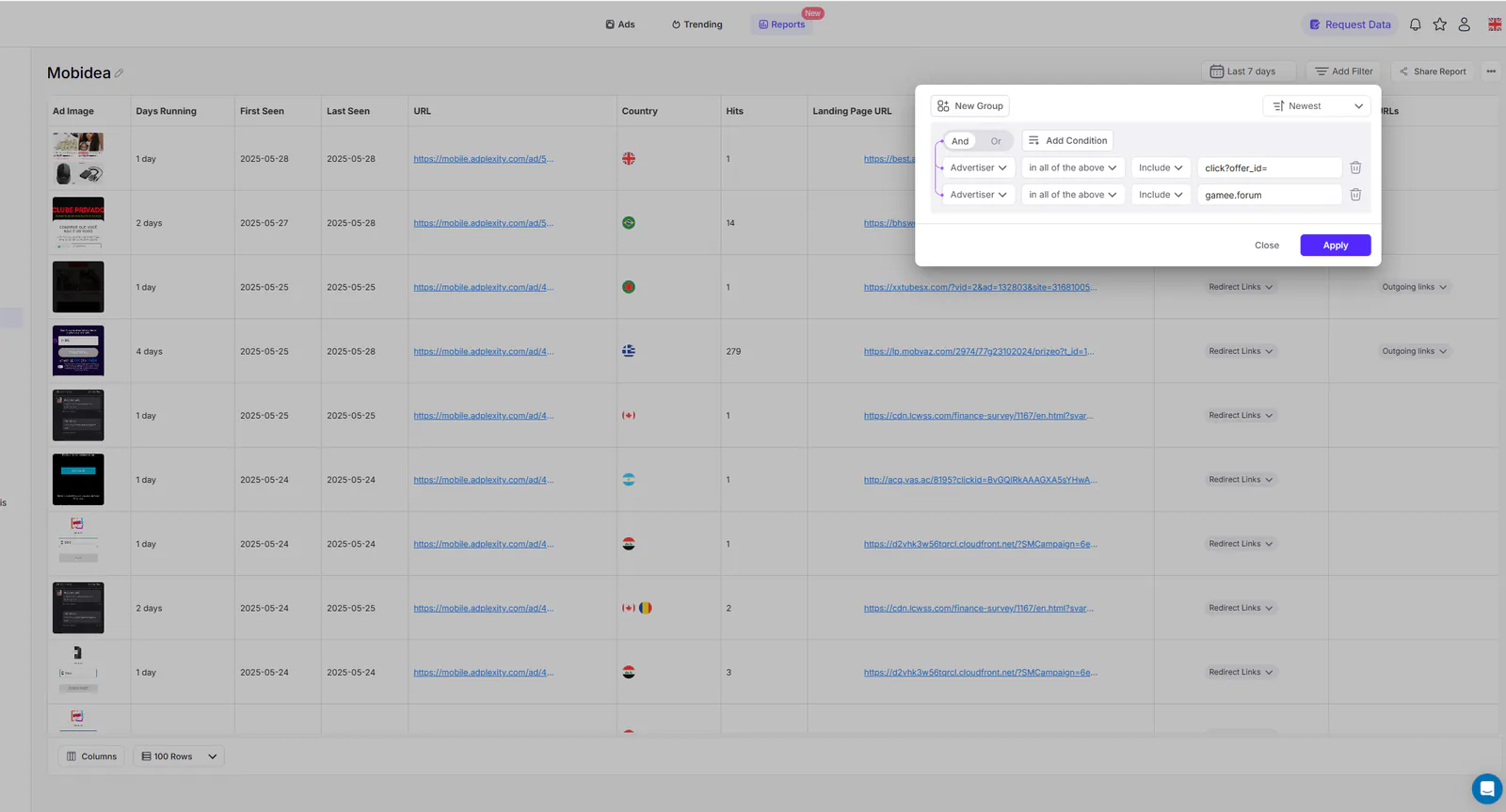
Mobidea uses consistent redirect patterns across campaigns, indicating its tracking software. This can be confirmed by the tracking domain, although it changes periodically (for example, "gamee.forum").
Golden Goose has a unique structure that’s different from other networks.
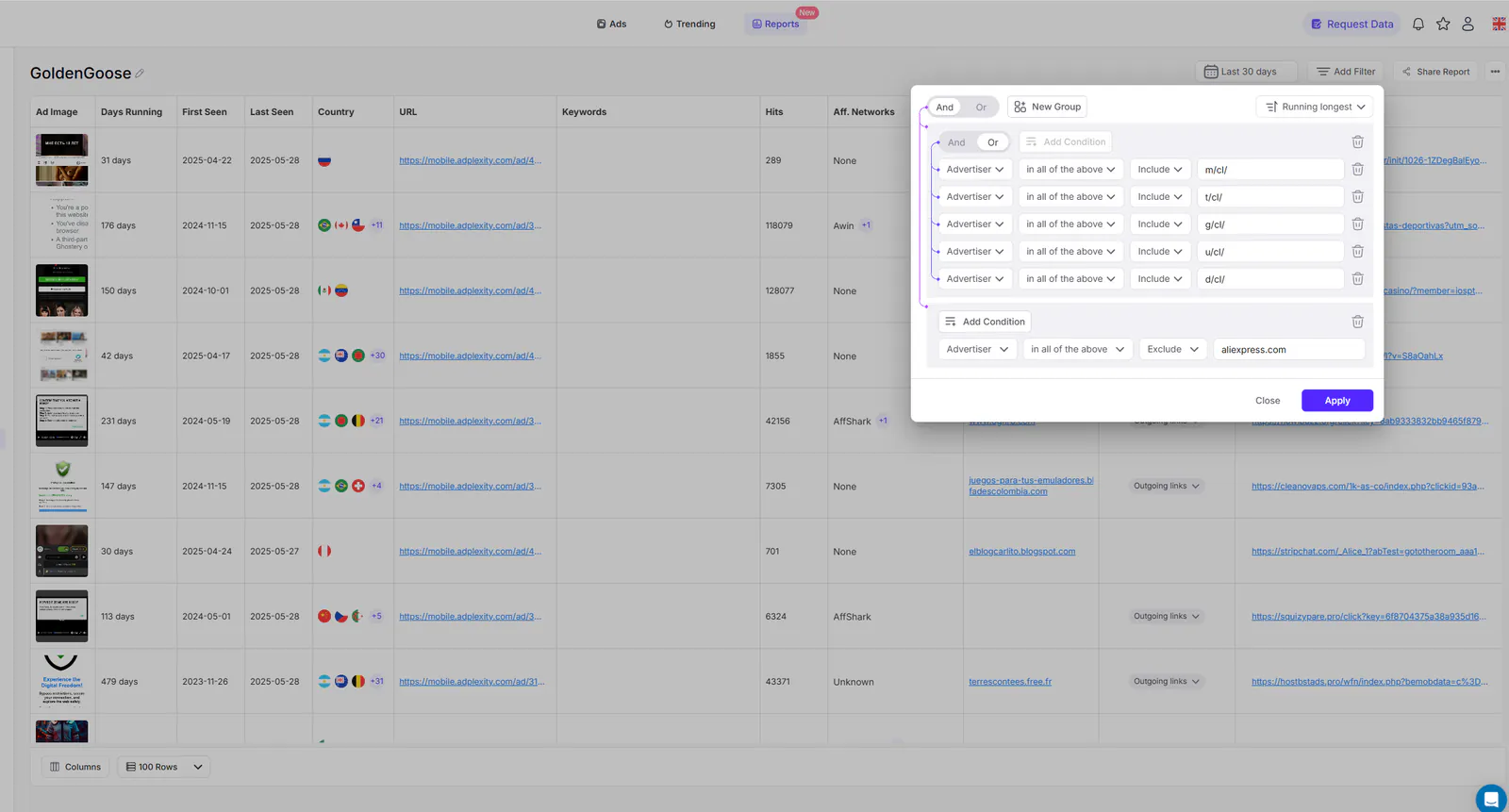
All of these ads are Golden Goose. You’ll notice that adding some exclusion filters can help generate more targeted reports by filtering out certain branded or cloaked ads, such as those redirected to AliExpress.
You can apply the same strategy to any affiliate network. All it takes is understanding which filters to include or exclude to pinpoint the right campaigns.
Traffic Company often includes “_hmac” and “&pi=” in URLs.
Filter Example:
- Advertiser + Include + _hmac
- Advertiser + Include + &pi=
- Advertiser + Exclude + unrelated offers
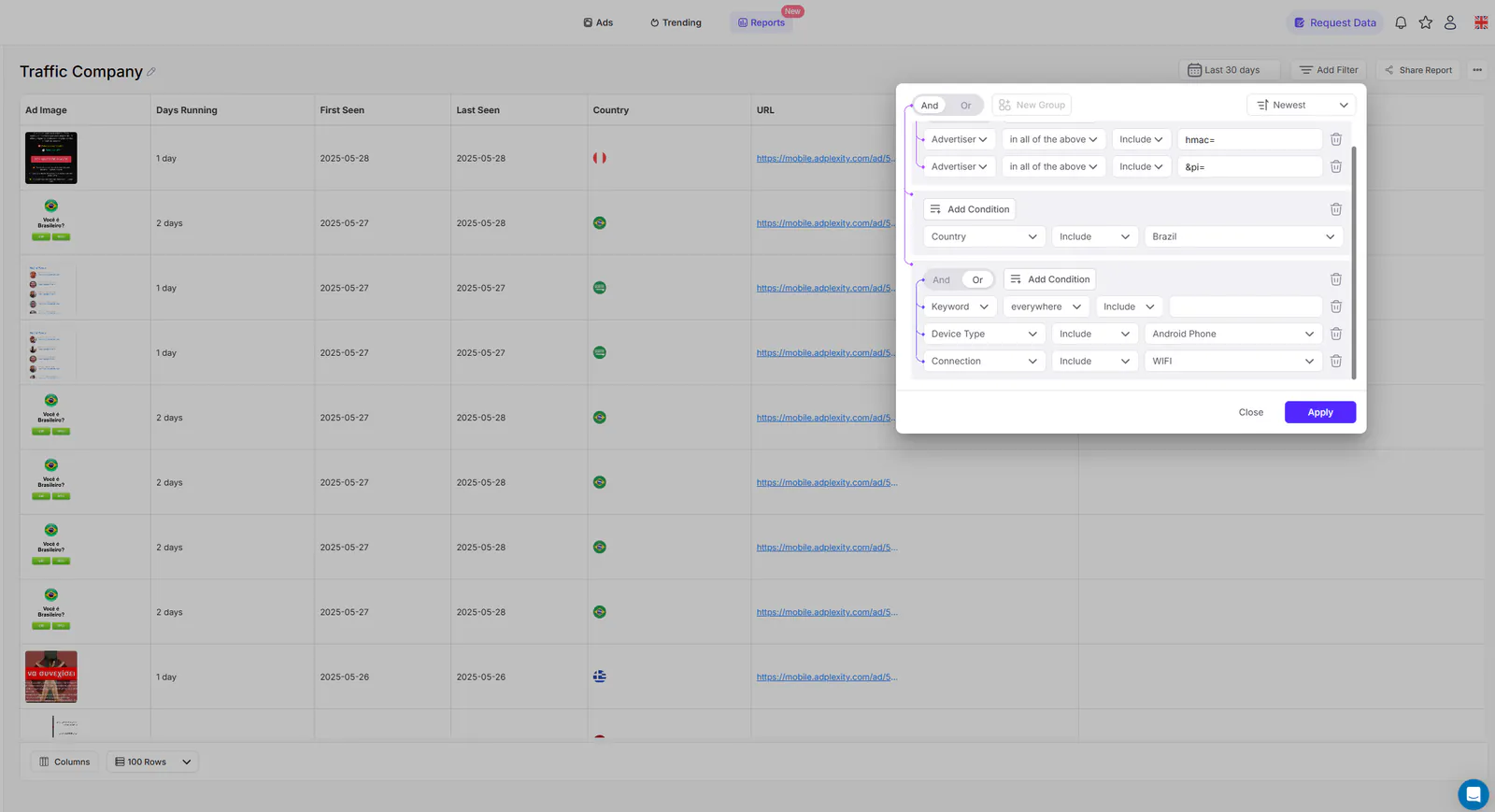
You can now isolate campaigns specific to these networks and schedule reports based on those criteria.
2. Identify Country-Specific Mobile Carrier Offers
If you’re targeting regions with mobile billing, Custom Reports can isolate offers by carrier using filters like:
- Connection: Mobile carrier (e.g., Etisalat, Vodafone, MTN), Include-Exclude "WIFI"
- Country: Egypt, South Africa, Saudi Arabia
Use language filters (e.g., Arabic, English) to narrow results even further. Our guide Spy on Mobile Ads Using Adplexity Advanced Search explains this in detail.
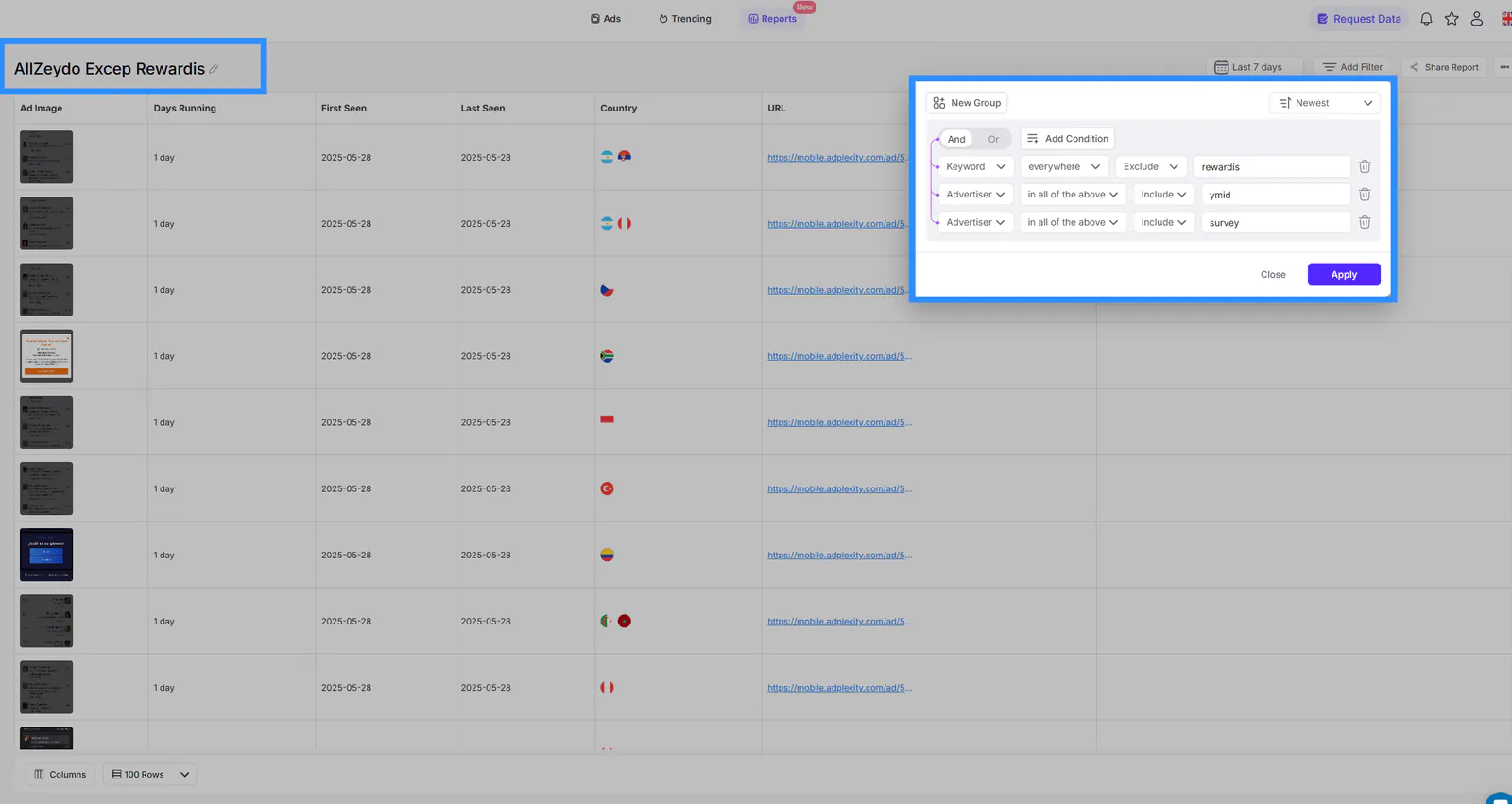
3. Monitor Survey Campaigns (Zeydoo)
Want to discover all survey offers from Zeydoo, or exclude Rewardis ones?
Setup:
- Advertiser + Include + ymid
- Advertiser + Include + -survey
- Keyword + Exclude + Rewardis
This exact combination ensures you’re only seeing Zeydoo-related survey ads, excluding Rewardis offers.
4. Spy on Exact Landing Pages by Keywords
If you’re trying to track hyper-specific landers that include keywords like:
- “هل أنت سعودي” (Are you Saudi?) Survey
- “Are you 18+?” Survey
- “Congratulations,” Sweeps
- "Yes or NO" Survey
- "Man or Woman" Survey
Then keyword reports are your best friend. Make sure these landing pages are already indexed on Adplexity, since being too specific might yield false negatives.
Pro Tips: How to Maximize Your Custom Reports
Here are some strategies to fine-tune your reporting system:
✅ Use the Advertiser Filter to Identify Patterns
Most affiliate networks use distinct subdomains or redirect paths. Using the Advertiser filter helps isolate traffic by tracker. Affiliate networks frequently update their domains and subdomains, so refresh your reports regularly to keep the data accurate.
✅ Apply AND/OR Logic Strategically
- Use AND logic for highly specific searches (e.g., Country + Device + Carrier)
- Use OR logic to cast a wider net across conditions
✅ Master the Filter Combinations
Adplexity gives you up to 15 filters. Use them to include or exclude data:
- Landing Page Language: Arabic, French, etc.
- Device Type: Android, iOS, Windows
- Days Running: only long-running, proven ads, or a specific range
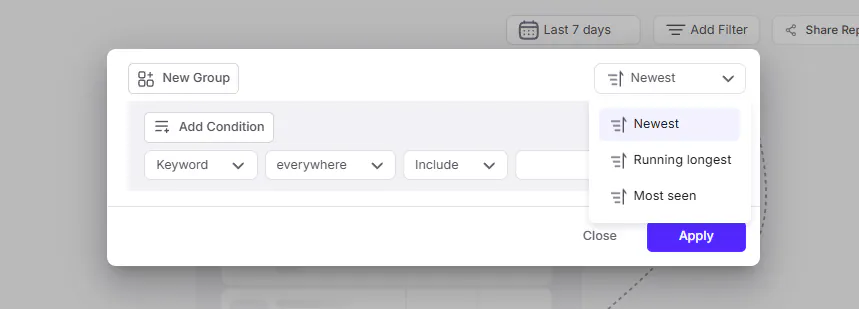
- Sorting: Organize your report results by 'Newest', 'Most Seen', or 'Running Longest'.
✅ Save and Reuse Filter Combinations
Once you’ve built a perfect set of filters, save them as templates. This ensures you can create similar reports in seconds.
Customizing Your Report View
Not only can you filter what goes into your reports, but you can also control how the data is displayed.
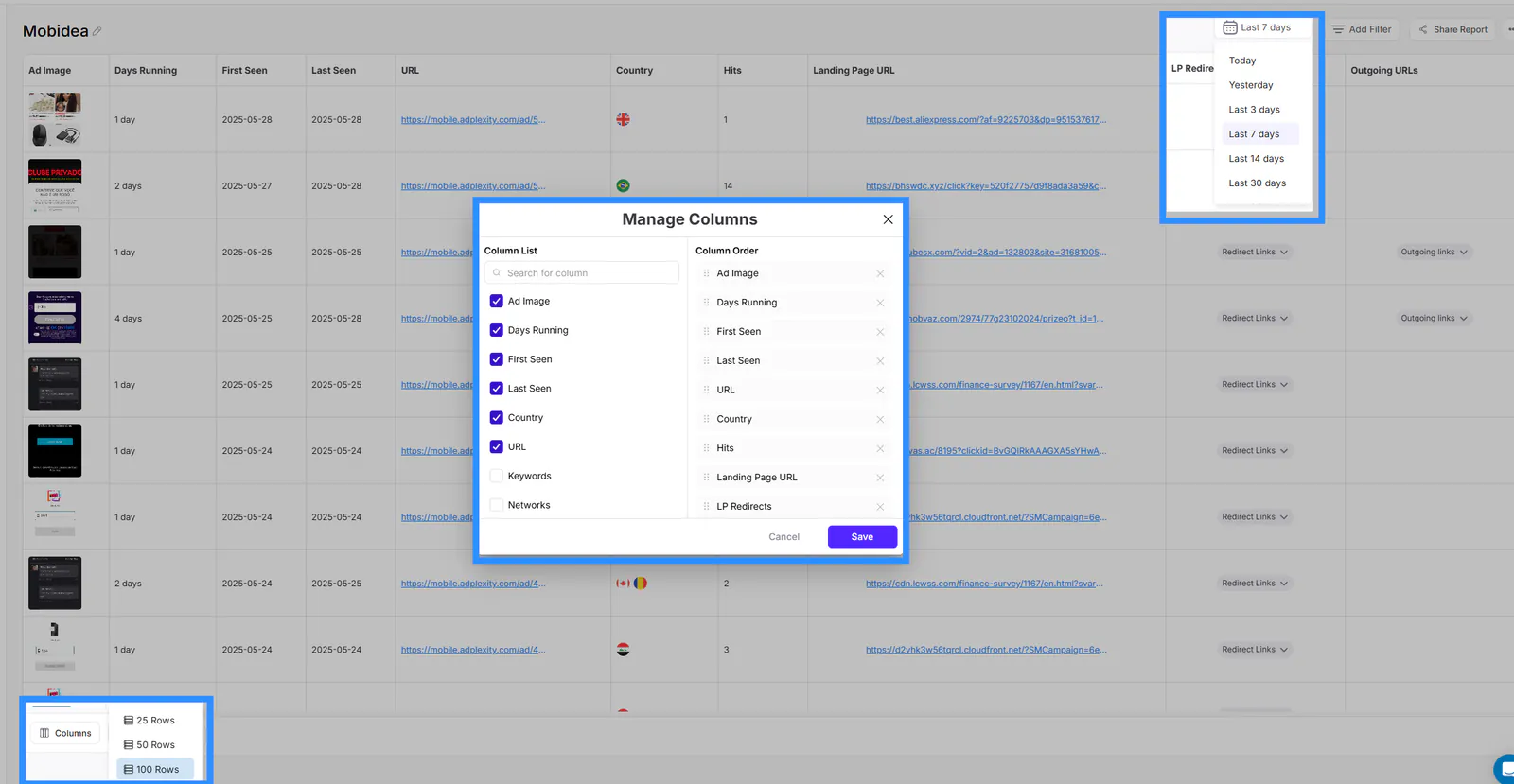
Columns you can customize: add, remove and reorder Ad Image, Days Running, First Seen / Last Seen, Country, URL, Keywords, Networks, Landing Page URL, Redirect Paths, Affiliate Networks, Vertical, Traffic Source, Publisher and Hits.
Display Options:
- Choose from 25, 50, or 100 rows per report
- Sort by Most Seen, Running Longest, or Newest
- Export to CSV or schedule to your Slack/email
Duration: Customize your report timeframe anywhere from 1 day up to 180 days to get the most relevant data.
Daily Workflow with Custom Reports
Let’s say you’re managing multiple verticals and need daily insights on:
- iOS carrier billing offers in Brazil
- Golden Goose sweepstakes ads in Arabic
- Newly launched push ads on Mobipium
- weight loss campaigns in the USA
With Custom Reports, you can:
- Set unique Reports for each niche
- Automate the delivery of results to your inbox every morning
This streamlines your research workflow, boosts speed to market, and helps you beat competitors to high-performing offers.
Conclusion: AdPlexity Custom Reports: A Must-Use Feature
In the ultra-competitive world of affiliate marketing, the difference between average and exceptional often comes down to how fast and accurately you can act on data. Adplexity Custom Reports are designed to give you this edge.
Whether you’re uncovering offers from specific affiliate networks like Mobipium or Golden Goose, tracking redirect patterns, spying on hyper-specific landing pages, or simply managing multiple verticals, Custom Reports simplify the complex.
With up to 15 advanced filters, dynamic grouping logic, and fully automated email delivery, this feature turns Adplexity into your personalized affiliate intelligence assistant.
If you’re not using Adplexity Reports yet, you’re not maximizing your investment in competitive intelligence.
🚀 Ready to elevate your ad spying game?
Start building your Custom Reports today and experience data-driven success like never before.